
Off-Peak Charging Program
Earn $50 off your energy bill and ongoing monthly savings with the Charge Smart MA app
This program allows customers with either a compatible electric vehicle (EV) or EV charger to earn rebates with the Charge Smart MA app. Reduce your EV charging costs by earning an average of $100 annually when you charge your EV during designated off-peak times and get a $50 enrollment incentive*. By charging your EV during off-peak times, you will help to increase the efficiency and reliability of the power grid.
Read our FAQs for more information about this program and rebates.
*Customers should expect the $50 enrollment incentive after participating in the Off-Peak Program for 90 days. Customers participating in the Residential EV Charging Upgrades rebate program will receive rebates for charging during off-peak times but will not receive the $50 enrollment incentive.
Start saving in four simple steps

Compatibility
See if your vehicle or charger are listed in the Compatible Vehicle List.

Download
Download the National Grid Charge Smart app from the Apple Store or Google Play Store.

Charge
Charge during off-peak hours, even easier if you use your vehicle’s timer.

Earn
Earn a rebate for every kWh of off-peak charging you do and watch your savings accumulate.
Compatibility
Click on the “View Compatible Vehicle and Charger List” dropdown to see if your vehicle or charger is currently compatible and you can enroll now.
Home Chargers:
- Acura Home Charging Station 48
- Autel: MaxiCharger AC Elite
- Autel: MaxiCharger AC Lite
- ChargePoint HomeFlex Charger
- Emporia Classic Level 2 EV Charger
- Emporia Pro Level 2 EV Charger
- Honda Home Charging Station 48
- Wallbox Pulsar Plus
-
AcuraZDX (2024-2026)
-
Alfa RomeoTonale (2023 – 2026)
- Audi
e-Tron (2019+), Q4 e-Tron (2022+), Q5 PHEV 2020+, Q6 e-tron (2025+), Q8 and Q8 Sportback e-tron (2024+), SQ8 e-tron (2024+), A6 e-Tron (2025+), A7 PHEV (2021+), A8 PHEV 2020+ - BMW
3 Series PHEV (2018-2023), 5 Series PHEV (2018-2023), 7 Series PHEV (2017+), i3 (2018-2021), i3 REX PHEV (2013+), i4 (2022+), i5 (2024+), i7 (2023+), i8 PHEV (2016-2017), iX(2022+), X3 PHEV (2020-2021), X5 PHEV (2017+), XM (2023-2026) - Cadillac (OnStar Subscription Required)
Escalade IQ (2025+), LYRIQ (2023+), Optiq (2022-2026), Vistiq (2026+) - Chevrolet (OnStar Subscription Required)
Blazer EV (2024-2026), Bolt EV (2017+), Equinox EV (2024 – 2026), Silverado EV (2024 – 2026), Spark EV (2015-2022), Volt PHEV (2016-2019) - Dodge
Charger (2024+), Hornet (2023+) - Fiat
500e (2024 – 2026) - GMC
Hummer EV (2022 – 2026), Sierra EV (2024 – 2026) - Honda
Prologue (2024 – 2026), Clarity (2018 – 2026) - Hyundai
Ioniq 5 (2022+), IONIQ 6 (2023+), IONIQ 9 (2026+), IONIQ EV (2017-2021), IONIQ PHEV (2018+), Kona EV (2019+), Santa Fe PHEV (2022+), Sonata PHEV (2017-2019), Tuscon PHEV (2022+) - Jaguar
I-Pace (2019+) - Jeep
Wagoneer S (2024+), Wrangler 4xe PHEV (2021 – 2026), Grand Cherokee 4xe PHEV (2022 – 2026) - Kia
EV6 (2022+), EV9 (2024+), Niro EV (2019+), Niro PHEV (2018+), Optima PHEV (2017-2020), Sorento PHEV (2022+), Soul EV (2017-2020), Sportage PHEV (2023+) - Land Rover
Range Rover (PHEV) P400e (2019-2021), Range Rover Sport (PHEV) P400e (2019-2021) - Lexus
NX PHEV (2024+), RX 450 H PHEV (2023+), RZ (2023+), TX PHEV (2024+) - Lucid
Air (2021 – 2026), Gravity (2026-2026) - Mazda
CX-90 (2024+), MX-30 (2022+), CX-70 PHEV (2025+) - Mercedes-Benz
CLA-Class (2026+), eSprinter (2024-2026), EQ Series (2022 – 2025), S-CLASS PHEV (2019 – 2025), GLC PHEV (2019 – 2020), GLE PHEV (2024-2025) - Mini
Cooper Electric (2020+), Countryman PHEV (2018+) - Nissan
Ariya (2023+), Rogue PHEV (2026+) - Polestar
2 (2021-2024), 3 (2025-2026), 4 (2026+) - Porsche
Panamera PHEV (2020 – 2023), Macan Electric (2024+), CAYENNE (2020+), TAYCAN (2020+) - Ram
1500 REV (2025+), Promaster EV (2025+) - Rivian
R1S (2022+), R1T (2022+) - Subaru
Solterra (2023 – 2026) - Tesla
Cybertruck (All Models), Tesla Model X (All Models), Tesla Model Y (All Models), Tesla Model S (All Models), Tesla 3 (All Models) - Toyota (Requires Toyota Connected Services)
bZ4X (2023+), C-HR EV (2026), Prius PHEV (2012-2026), Prius Prime (2017 – 2024), Rav 4 PHEV (2025 – 2026), Rav 4 Prime (2021- 2024) - Volkswagen (Requires Car Net subscription)
e-Golf (2020+), ID.Buzz (2025+), ID.4 (2021+) - Volvo
C40 Recharge (2022-2024), EX 30 (2025-2026), EX 90 (2025-2026), S60 PHEV (2019-2022), S90 PHEV (2018-2021), V60 PHEV (2013-2022), V90 PHEV (2018 – 2021), XC40 PHEV (2021 – 2024), XC60 PHEV (2018-2021 and 2025+), XC90 PHEV (2016-2022 and 2025+)
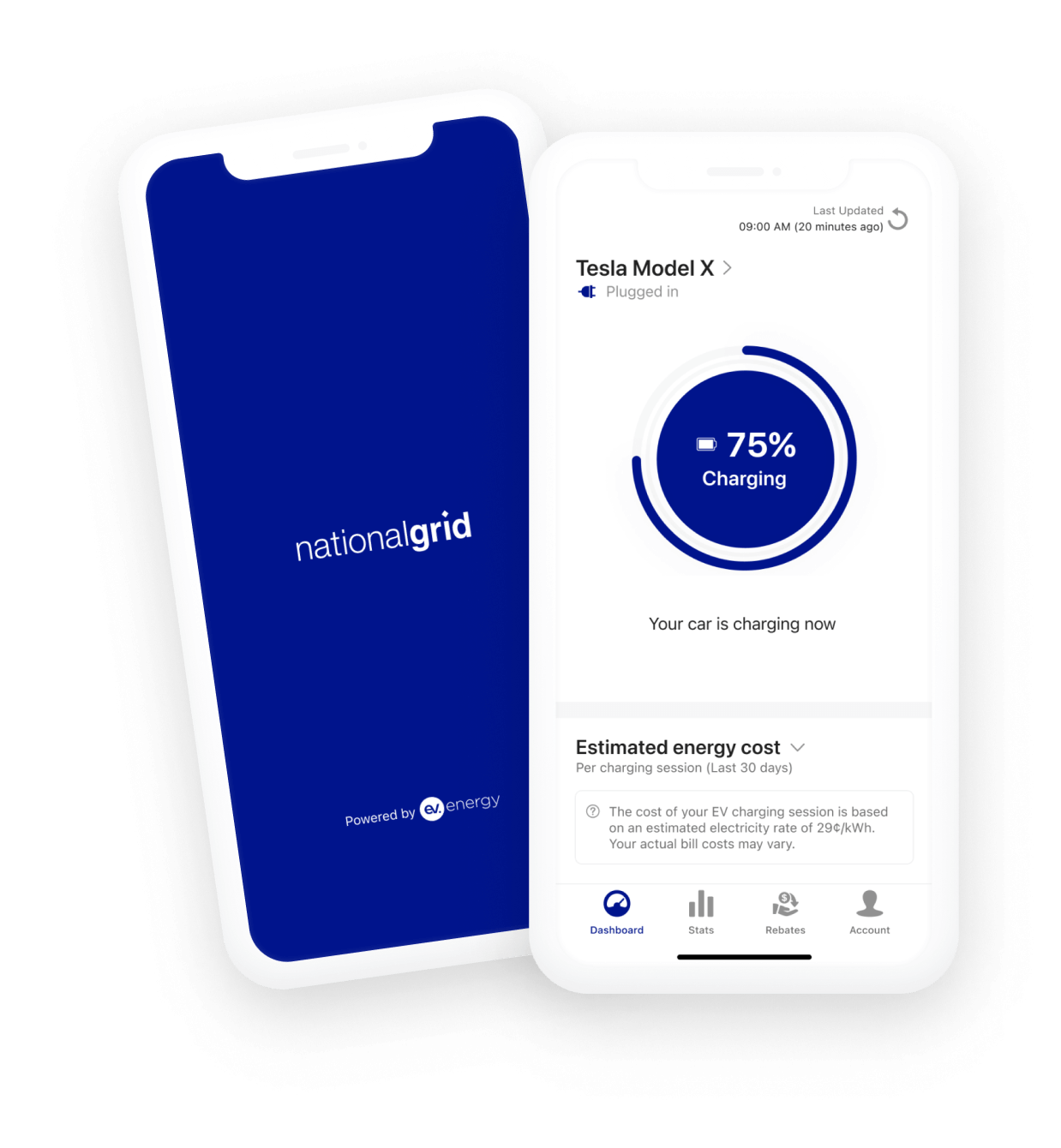
Steps to enroll in the program
- Download the National Grid Charge Smart MA app or sign up using the web portal.
- Verify your National Grid account.
- Connect your vehicle or charger using your existing manufacturer login details to enroll in the program.
- For technical support, contact chargesmartma@ev.energy

Charge off-peak and watch your rebates accumulate
Track all of your charging, estimated energy bill costs, and off-peak rebates in the app. Participants are eligible to earn $0.05/kWh for EV charging during off-peak hours from June 1 to September 30 (“summer months”) and $0.03/kWh for EV charging during off-peak hours from October 1 through May 31 (“non-summer months”). Starting November 1, 2025 Off-Peak hours are every day from 9:00pm to 1:00pm the following day. Charging must occur in Massachusetts.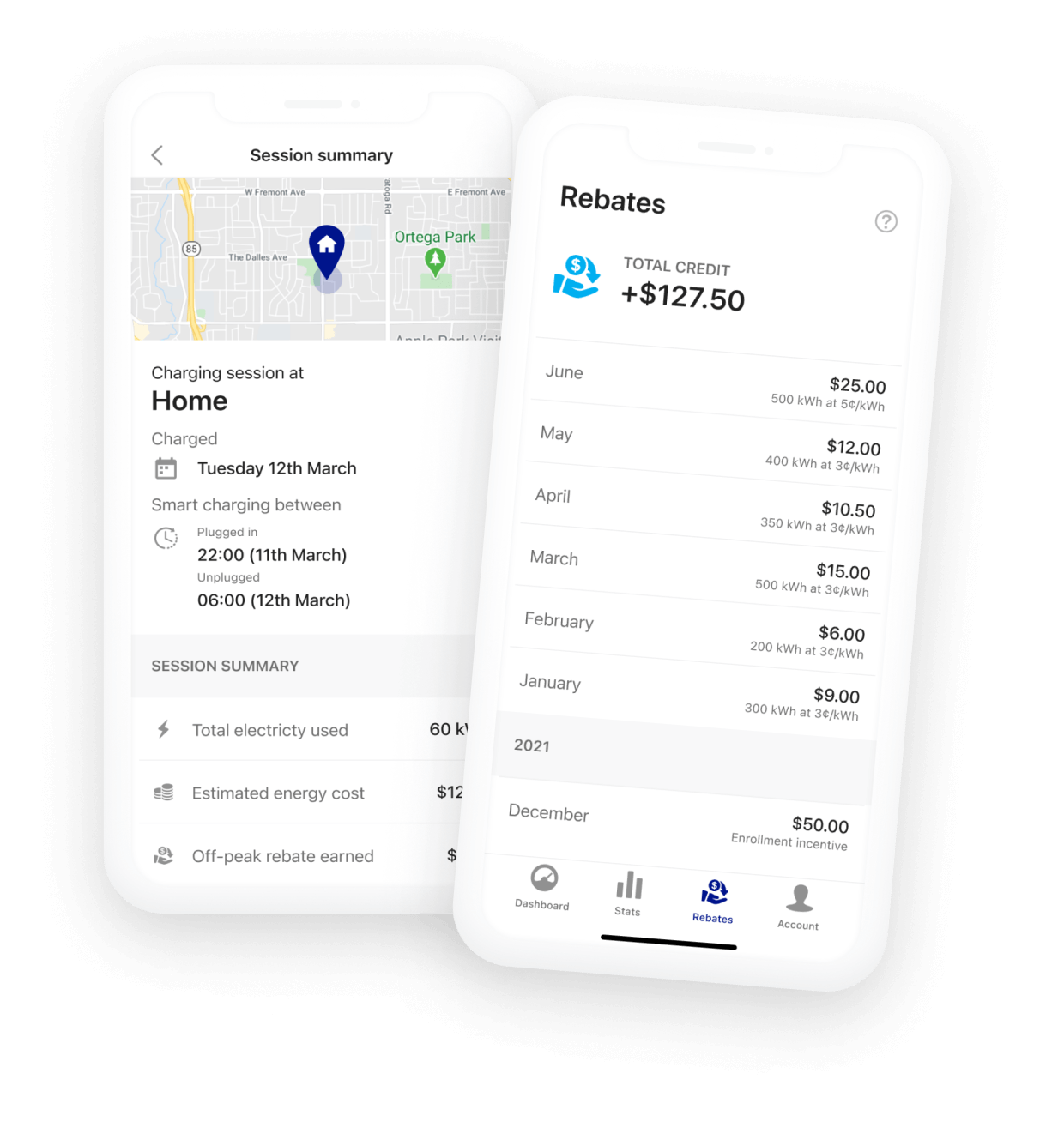
Vehicle or charger not supported?
Fill out the form below to be notified as we add new vehicles and chargers to the program.
Please be advised that this program is for Massachusetts National Grid Residential electric service customers.
Please review the compatible vehicle and charger dropdown list above prior to joining the waitlist. Your vehicle may already qualify.
Customer Testimonials
National Grid’s off-peak window from 9:00 p.m. to 1:00 p.m. is when demand for electricity is at its lowest, meaning that EV owners that charge off-peak are helping reduce the cost of charging and improving resiliency for the electrical grid. Additionally, when demand for electricity is lower, National Grid can utilize more carbon-free resources to provide electricity. Off-peak charging is more affordable, reliable, and green!
To login to the Charge Smart MA app, you will need to connect to your National Grid profile. If you do not have an existing National Grid profile, you will need to create one at www.nationalgridus.com and connect it to an existing Massachusetts or Nantucket Electric Company account. If there is an existing National Grid profile for your electric account; but you do not control it, you will need to register for access. You can do this on the National Grid login page. Once you have the National Grid profile you can return to the Charge Smart MA app login screen either in the app or on the web portal and login.
Once you download the Charge Smart MA app on your mobile device, we’ll ask you to connect to your electric vehicle (EV) or home charger using the username and password on your compatible EV or home charger account. This uses a secure process, similar to logging into a website with your Facebook or Gmail account.
You must have either an EV with telematics capability or a level 2 connected home EV charger listed on the Charger and Compatible Vehicle List to actively participate.
Read-only charging allows ev.energy and National Grid to view your vehicle’s charging. We will take a reading of your EV’s battery level then calculate how many kWh of charging are done during National Grid’s off-peak times. Your charging is not controlled through this program.
If you’ve bought a new car since signing up, you will need to unlink or remove your previous vehicle from the Charge Smart MA app.
To unlink your vehicle but keep your data:
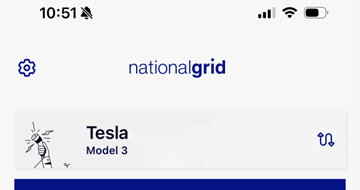
- Navigate to the Settings page by tapping on the cogwheel icon from your Dashboard screen
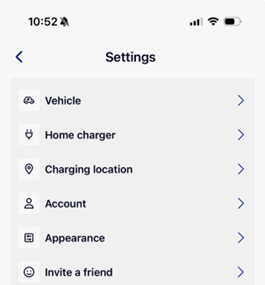
- Tap ‘Vehicles’ and then select the vehicle you’d like to disconnect
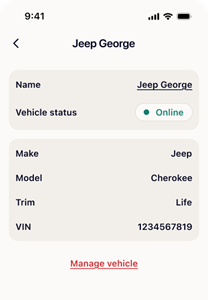
- Tap ‘Manage vehicle’
- Select ‘Unlink vehicle account’
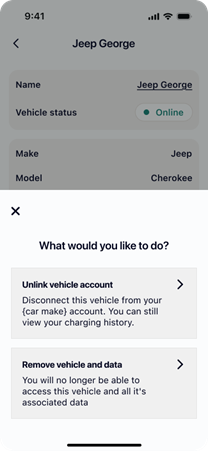
If you’d like to delete the vehicle and all associated data:
- Follow the steps above to get to ‘Manage vehicle’
- Select the option ‘Remove vehicle and all data’
- Confirm by ticking the box and selecting ‘Remove vehicle’
After following these steps, you can go ahead and add your new vehicle to the Charge Smart MA app from the Vehicles page.
We do not see or store your EV and/or home charger username and password. Once you enter your username and password, we instantly exchange them with the vehicle and/or home charger manufacturer for a secure token that allows us to be able to continue to access your account to optimize your charging throughout the program. This token is stored securely and encrypted in ev.energy’s cloud platform, hosted by Amazon Web Services.
National Grid’s partner, ev.energy, will take a reading of your EV’s battery level, then calculate how many kWh of charging are done during National Grid’s off-peak times. National Grid will then use this data to award rebates based on your charging behavior.
The off-peak rebate is paid as a fixed per-kWh rate for charging your EV in Massachusetts during the designated off-peak hours. Starting November 1, 2025 off-peak hours are every day from 9:00pm to 1:00pm the following day.
Participants are eligible to receive a reward of $0.05/kWh for EV charging during off-peak hours from June 1 to September 30 (“summer months”) and $0.03/kWh for EV charging during off-peak hours from October 1 through May 31 (“non-summer months”).
National Grid combines your charging data with that of all the other program participants and aggregates it into a set of metadata that is stored on ev.energy’s secure servers, which are hosted by Amazon Web Services.
Massachusetts EV Off-Peak Charging Program participants can receive rebates as Bill Credits, PayPal, or Venmo electronic payments. You can select or change your payment method in the Incentives tab in the ChargeSmart MA app.
- PayPal/Venmo: Paid on the last day of each month for the prior month’s charging.
- Bill Credits: Data for the previous month is batched on the second Friday of the month, If your bill is generated after this date, the credit will appear on your next bill. If your billing cycle occurs prior to the second Friday, the credit will appear on the following month’s bill.
Note: Incentives for a charging session can take up to 24 hours to appear in the app after the session completes.
Participants are eligible to receive a reward of $0.05/kWh for EV charging during off-peak hours from June 1 to September 30 (“summer months”) and $0.03/kWh for EV charging during off-peak hours from October 1 through May 31 (“non-summer months”). The rebates are calculated for each calendar month and administered to customers on the 2nd Friday of the following month.
PayPal or Venmo payments are paid on the last day of each month for the previous month’s charging. Bill credits are processed on the second Friday of the month and applied to your next electric bill. . If your billing cycle occurs prior to the second Friday, your credit may appear on the following month’s bill.
For example, if you earned $10.00 for charging your EV during off-peak hours during the month of January, you would see a $10.00 credit applied to your bill in February if it is generated on or after the second Friday of February. If your billing cycle occurs prior to the second Friday for a given month, the rebates are then applied on the subsequent month’s bill.
Regardless of if you are connecting to the Charge Smart MA app via a home charger or your EV, providing National Grid with this information helps us accurately report your charging data in-app, as well as effectively respond to any inquiries or questions about your charging experience. However, you will only need to connect one piece of compatible hardware to participate in the program.
You are free to stop participating in the program at any time, simply tap the cogwheel icon on your Dashboard screen to access your settings page. Then head to Account and tap the option ‘Close my account’ and confirm you are happy to continue by tapping ‘request account closure’ on the confirmation page. If you change your mind you can head back to the app and select ‘Cancel closure’. You have 7 days to do so before your account and all its associated data are deleted.
Once you disconnect your EV, we will no longer be able to read the charging on your vehicle. Any data from previous charging sessions will be combined with other customers’ data. The aggregate data will be analyzed by National Grid to assess the benefits of the program. You will need to re-enter your login details to reconnect to the platform.
You can enroll a maximum of two EVs or one home charger in the MA EV Off-Peak Charging Program.
Yes! As long as your vehicles are compatible with the program. You can either add multiple vehicles under the same EV account or from different manufacturers. You can also add vehicles from the same manufacturer/brand under different accounts. Once you are done adding your first vehicle, head to the Settings page, then tap Vehicle and ‘Add new vehicle’. If your second vehicle is not compatible with the Charge Smart MA app, you will need a compatible charger in order to enroll it successfully.
As a reminder, the Massachusetts Off-Peak Rebate Program only allows two vehicles per household.
If you need to update the National Grid account where you charge your EV — for example, if you are moving to another home in Massachusetts served by National Grid — you can do so in the app’s settings. Tap the cogwheel icon from your Dashboard screen, select Billing Account and choose the Residential Electric account where you charge your EV.
Some vehicle manufacturers require an active connected-services subscription (such as OnStar, Toyota Connected Services, or VW Car-Net) to share charging data with ChargeSmart MA.
We use your vehicle’s telematics connection to securely access charging data. Without this connection, the app cannot record your off-peak charging sessions and you will not earn rebates.
Some automakers charge for their connected services plans. Subscription costs are set by the vehicle manufacturer and are separate from the program.
For most drivers, the average off-peak savings of about $100 per year, plus other available incentives, outweighs the cost of a basic connected-services plan. Your total benefit will depend on how often you charge during off-peak hours.
No. Charge Smart MA is completely free to join and there are no ongoing costs to participate. If you rely on a vehicle integration to participate, some automakers may charge for their connected services plans. Subscription costs are set by the vehicle manufacturer and are separate from the program.
You must have a National Grid Massachusetts electric account for a residential property, live within the National Grid MA electric service area, have online access to your National Grid billing account, and have either a compatible EV or a compatible home charger (you only need one, not both).
Missing location data occurs when your vehicle’s manufacturer does not send full charging information through its telematics system. This may be temporary or related to your connected-services subscription status.
Certain vehicles may need extra permissions before we can access location data. For instance, if you're connecting a Tesla, remember to select the option to share location data when granting permissions.
Occasional disconnections can happen due to OEM outages, poor connectivity in the area or if you change your OEM login credentials. Make sure your connected-services subscription is active and if you changed your credentials, open the ChargeSmart MA app and reconnect your vehicle.
You can still join using your supported charger. Simply download the Charge Smart MA app, log in with your National Grid online billing credentials, and follow the prompts. If you are unable to add your vehicle due to lack of compatibility, contact our support team at chargesmartma@ev.energy, and include the vehicle make, model and battery size.
The cost data shown in the app is informational only. It reflects the average R-1 or R-2 rate for National Grid supply and distribution rates and does not impact what you are charged on your actual electricity bill.
Since there is some overlap between the off-peak hours and when solar panels may be generating electricity, it is possible to charge your EV using electricity generated by your solar panels and still get the off-peak charging credit for any charging that occurs up to 1:00pm. Charging that extends beyond 1:00pm will not count towards an incentive in the Off-Peak Charging Program.
Customers are able to enroll in the program by either downloading the Charge Smart MA app or using the program web portal. Both options allow any eligible customer to enroll and earn credits; however the Charge Smart MA app has more features available to customers. This includes allowing customers to see their historic credits earned, energy used, historical view of charging sessions,
Customers are able to use either method to participate in the program. Can customers that enroll using the app also access the web portal?
Your Charge Smart MA account does not update automatically. You will need to tap the Reconnect button in the Charge Smart MA app or on the web portal, which will prompt you to log back in to your vehicle or charger account. If you need help, please contact our support team at chargesmartma@ev.energy.
Charge off-peak and watch your rebates accumulate
Track all of your charging, estimated energy bill costs, and off-peak rebates in the app. Participants are eligible to earn $0.05/kWh for EV charging during off-peak hours from June 1 to September 30 (“summer months”) and $0.03/kWh for EV charging during off-peak hours from October 1 through May 31 (“non-summer months”). Starting November 1, 2025 Off-Peak hours are every day from 9:00pm to 1:00pm the following day. Charging must occur in Massachusetts.